
Security Log Event 4741. How to Detect Suspicious Computer Account Creation in Active Directory
1. Legitimate activity.
Event «A computer account was created» (A computer account was created) is generated on the domain controller each time a new computer object is created in Active Directory.
The following figure shows the fields of the event recorded during a standard computer join to the Active Directory domain. During this procedure not only is the computer object created, but a sequence of related actions is performed:
- the computer name is set;
- the account password is set;
- a secure channel with the domain is established;
- the attribute value
dNSHostName; - service principal names (SPN) are registered;
- other object attributes are set.
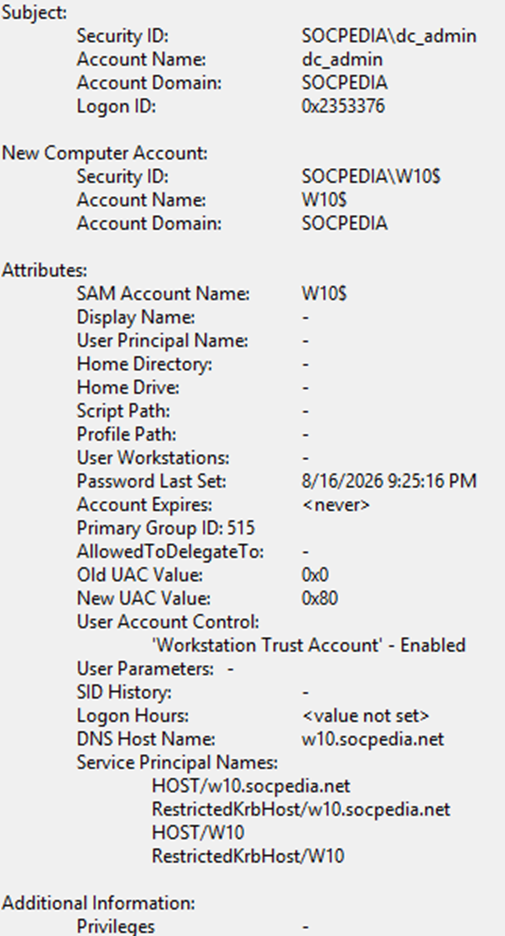
This allows establishing baseline field values and subsequently detecting deviations characteristic of suspicious activity.
On first analysis such deviations may be unnoticed; however emulating different unauthorized-activity scenarios helps determine how they differ from normal operations.
2. Detecting suspicious activity.
Below are field values of this event that Microsoft documentation considers indicators of potentially suspicious activity.
SAM Account Name: empty or -
This field should contain the computer account name. If it is empty or has the value -, this may indicate an anomaly.
The following fields have a value other than -
Display Name;User Principal Name;Home Directory;Home Drive;Script Path;Profile Path;User Workstations;AllowedToDelegateTo.
As a rule, for new computer accounts these fields have the value -. Other values may indicate an anomaly and the activity should be analyzed.
Password Last Set has the value <never>
Usually this means the computer account was created manually and the activity should be analyzed.
Account Expires has a value other than <never>
As a rule, for new computer accounts this field has the value <never>. Other values may indicate an anomaly and require analysis.
PrimaryGroupID has any value other than 515
As a rule, PrimaryGroupID has one of the following values:
516— for domain controllers;521— for read-only domain controllers (RODC);515— for servers and workstations (domain-joined computers).
If PrimaryGroupID has the value 516 or 521, this is a new domain controller or RODC, which requires verification.
If the value differs from 516, 521 or 515, it is atypical and requires analysis.
Old UAC Value has a value other than 0x0
As a rule, for new computer accounts this field has the value 0x0. Other values may indicate an anomaly and require analysis.
SID History has a value other than -
This field always has the value -, unless the account has been migrated from another domain.
Logon Hours has a value different from <value not set>
For new computer accounts this field should always have the value <value not set>.
3. User Account Control field values recommended for analysis.
Microsoft recommends monitoring the following values of the User Account Control.
Encrypted Text Password Allowed — Enabled
Should not be enabled for computer accounts. By default it is not set and cannot be set in the account properties in Active Directory Users and Computers.
Server Trust Account — Enabled
Should be enabled only for domain controllers.
Don't Expire Password — Enabled
Should not be enabled for new computer accounts, because by default the password is automatically changed every 30 days.
For computer accounts this flag cannot be set in the account properties in Active Directory Users and Computers.
Smartcard Required — Enabled
Should not be enabled for new computer accounts.
Trusted For Delegation — Enabled
Should not be enabled for new member servers and workstations. By default it is enabled for new domain controllers.
Not Delegated — Enabled
Should not be enabled for new computer accounts.
Use DES Key Only — Enabled
Should not be enabled for new computer accounts. For computer accounts it cannot be set in the account properties in Active Directory Users and Computers.
Don't Require Preauth — Enabled
Should not be enabled for new computer accounts. For computer accounts it cannot be set in the account properties in Active Directory Users and Computers.
Trusted To Authenticate For Delegation — Enabled
By default should not be enabled for new computer accounts.
4. Practical examples. Creating a computer account using PowerShell.
The following example shows creating a computer object using a PowerShell script. The parameters set are close to the values produced during a standard computer join to the domain.
New-ADComputer `
    -Name 'comp04' `
    -SamAccountName 'COMP04$' `
    -DNSHostName 'comp04.socpedia.net' `
    -ServicePrincipalNames @(
        'HOST/comp04.socpedia.net',
        'RestrictedKrbHost/comp04.socpedia.net',
        'HOST/comp04',
        'RestrictedKrbHost/comp04'
    ) `
    -Enabled $true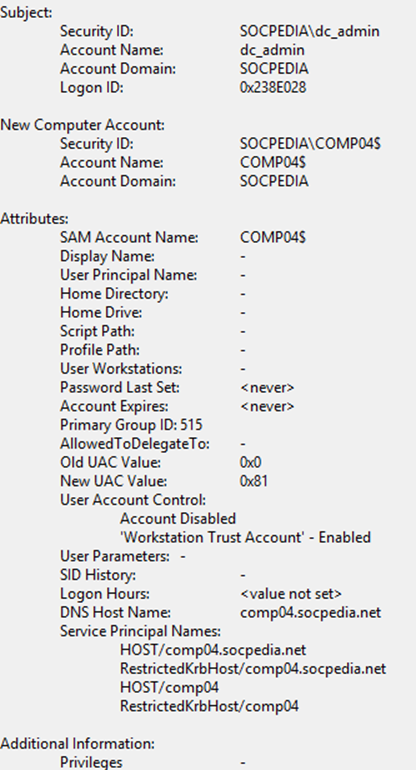
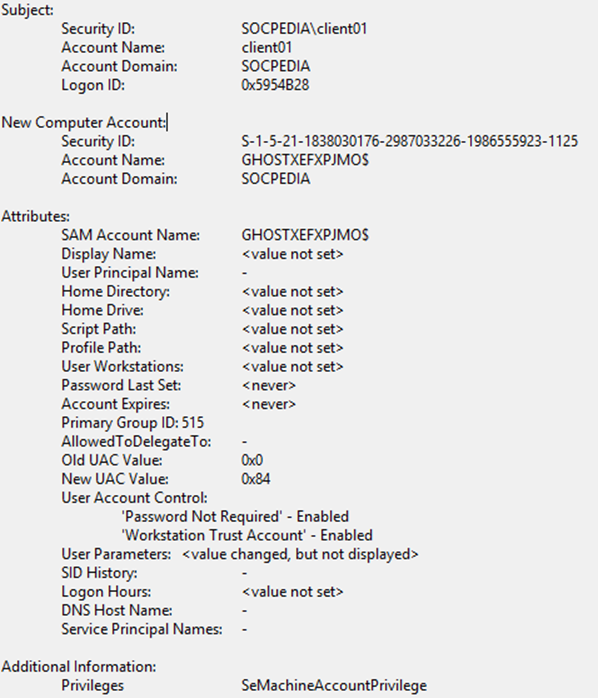
In the timeline «Examples of computer account creation events» examples are given of events for various computer accounts at their creation; events corresponding to suspicious activity are highlighted in yellow and red.